# Initialisation & configuration basique
**Notes pré installation :**
Les câbles console de chez Cisco fonctionne très bien.
| **Baud Rate** | **Data Bits** | **Parity** | **Stop Bits** | **Flow Control** |
| 9600 | 8 | None | 1 | Off |
#### Configuration via GUI quick config
[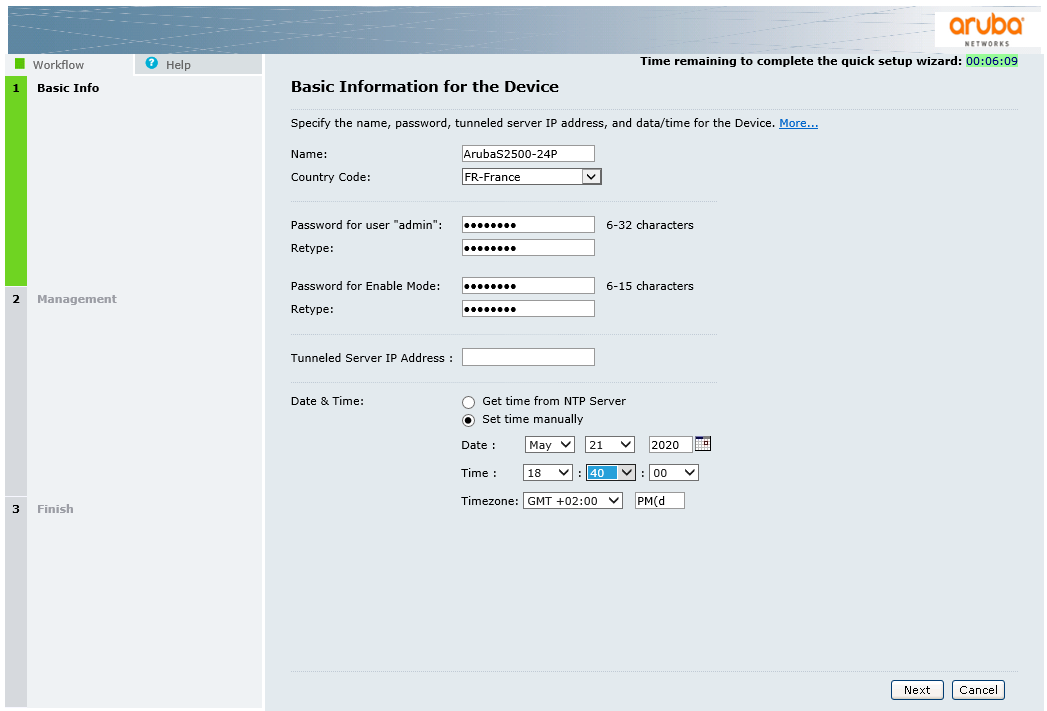](https://doc.ataxya.net/uploads/images/gallery/2020-05/Aruba-1.png)
[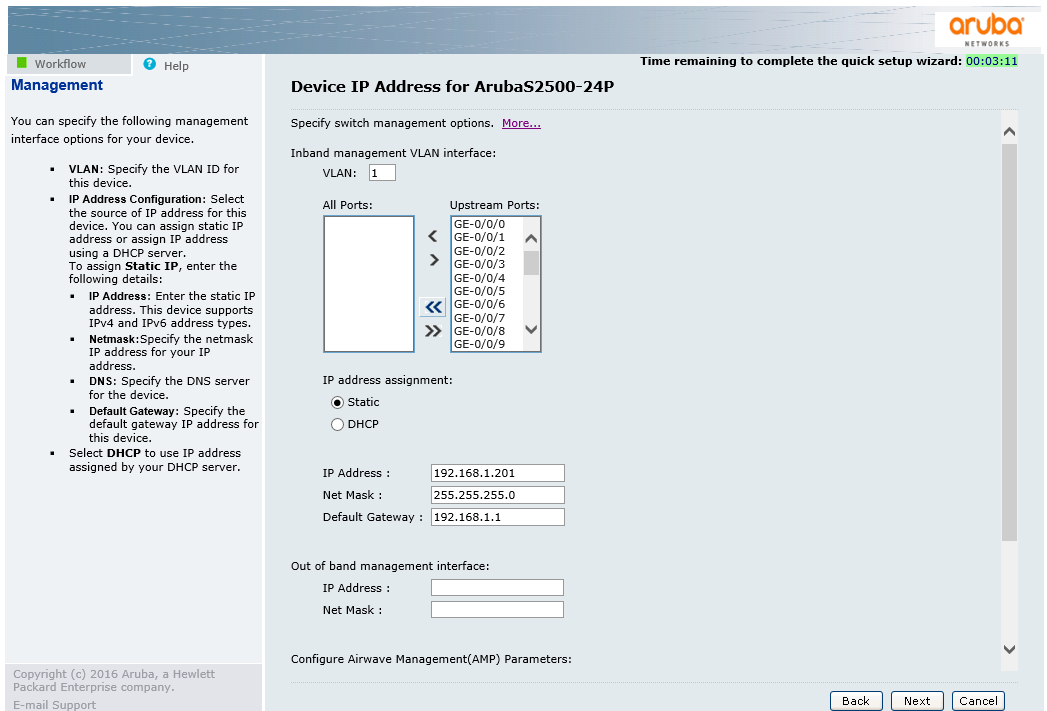](https://doc.ataxya.net/uploads/images/gallery/2020-05/Aruba-2.png)
La mise en page sous IE est étrange, mais l'important est de pouvoir la valider la configuration basique.
[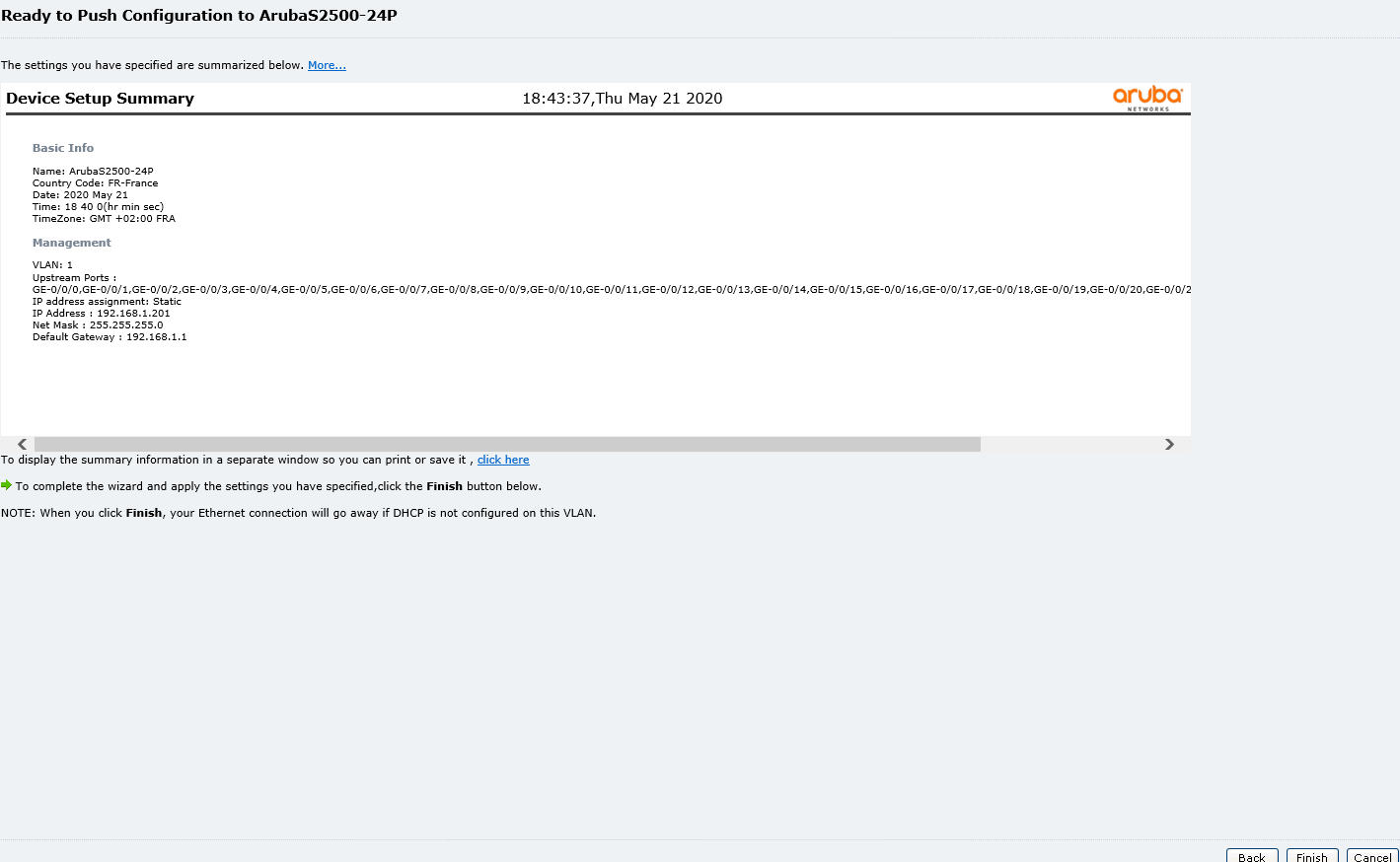](https://doc.ataxya.net/uploads/images/gallery/2020-05/Aruba-3.png)
#### Casser le staking présent par défaut
> (ArubaS2500-24P) (config) #**show interface brief**
>
> Interface Admin Link Line Protocol Speed/Duplex
> \--------- ----- ---- ------------- ------------
> GE0/0/0 Enable Up Up 1 Gbps / Full
> GE0/0/1 Enable Down Down N/A
> GE0/0/2 Enable Up Up 100 Mbps / Full
> GE0/0/3 Enable Down Down N/A
> GE0/0/4 Enable Up Up 100 Mbps / Full
> GE0/0/5 Enable Down Down N/A
> GE0/0/6 Enable Up Up 100 Mbps / Full
> GE0/0/7 Enable Down Down N/A
> GE0/0/8 Enable Up Up 100 Mbps / Full
> GE0/0/9 Enable Down Down N/A
> GE0/0/10 Enable Down Down N/A
> GE0/0/11 Enable Down Down N/A
> GE0/0/12 Enable Down Down N/A
> GE0/0/13 Enable Down Down N/A
> GE0/0/14 Enable Down Down N/A
> GE0/0/15 Enable Down Down N/A
> GE0/0/16 Enable Down Down N/A
> GE0/0/17 Enable Down Down N/A
> GE0/0/18 Enable Down Down N/A
> GE0/0/19 Enable Down Down N/A
> GE0/0/20 Enable Down Down N/A
> GE0/0/21 Enable Down Down N/A
> GE0/0/22 Enable Down Down N/A
> GE0/0/23 Enable Down Down N/A
> GE0/1/0 Enable Down Down N/A
> GE0/1/1 Enable Down Down N/A
> MGMT Enable Down Down N/A
>
> (ArubaS2500-24P) (config) # **show stacking interface**
>
> **stack1/2**
> \--------
> stack1/2 is administratively Enabled, link is Down, line protocol is Down
> Speed: N/A, MTU: 9224 bytes, Link flaps: 0
> Last update of counters: 0d 00:00:00 ago
> Last clearing of counters: 0d 00:00:00 ago
> Link status last changed: 0d 00:00:00 ago
> Statistics:
> Received 0 frames, 0 octets
> 0 pps, 0 bps
> 0 broadcasts, 0 runts, 0 giants, 0 throttles
> 0 error octets, 0 CRC frames
> 0 multicast, 0 unicast
> Transmitted 0 frames, 0 octets
> 0 pps, 0 bps
> 0 broadcasts, 0 throttles
> 0 multicast, 0 unicast
> 0 errors octets, 0 deferred
> 0 collisions, 0 late collisions
>
> **stack1/3**
> \--------
> stack1/3 is administratively Enabled, link is Down, line protocol is Down
> Speed: N/A, MTU: 9224 bytes, Link flaps: 0
> Last update of counters: 0d 00:00:00 ago
> Last clearing of counters: 0d 00:00:00 ago
> Link status last changed: 0d 08:13:09 ago
> Statistics:
> Received 0 frames, 0 octets
> 0 pps, 0 bps
> 0 broadcasts, 0 runts, 0 giants, 0 throttles
> 0 error octets, 0 CRC frames
> 0 multicast, 0 unicast
> Transmitted 0 frames, 0 octets
> 0 pps, 0 bps
> 0 broadcasts, 0 throttles
> 0 multicast, 0 unicast
> 0 errors octets, 0 deferred
> 0 collisions, 0 late collisions
>
> (ArubaS2500-24P) (config) # delete stacking interface stack 1/2
> (ArubaS2500-24P) (config) # delete stacking interface stack 1/3
> (ArubaS2500-24P) (config) #show interface brief
>
> Interface Admin Link Line Protocol Speed/Duplex
> \--------- ----- ---- ------------- ------------
> GE0/0/0 Enable Up Up 1 Gbps / Full
> GE0/0/1 Enable Down Down N/A
> GE0/0/2 Enable Up Up 100 Mbps / Full
> GE0/0/3 Enable Down Down N/A
> GE0/0/4 Enable Up Up 100 Mbps / Full
> GE0/0/5 Enable Down Down N/A
> GE0/0/6 Enable Up Up 100 Mbps / Full
> GE0/0/7 Enable Down Down N/A
> GE0/0/8 Enable Up Up 100 Mbps / Full
> GE0/0/9 Enable Down Down N/A
> GE0/0/10 Enable Down Down N/A
> GE0/0/11 Enable Down Down N/A
> GE0/0/12 Enable Down Down N/A
> GE0/0/13 Enable Down Down N/A
> GE0/0/14 Enable Down Down N/A
> GE0/0/15 Enable Down Down N/A
> GE0/0/16 Enable Down Down N/A
> GE0/0/17 Enable Down Down N/A
> GE0/0/18 Enable Down Down N/A
> GE0/0/19 Enable Down Down N/A
> GE0/0/20 Enable Down Down N/A
> GE0/0/21 Enable Down Down N/A
> GE0/0/22 Enable Down Down N/A
> GE0/0/23 Enable Down Down N/A
> GE0/1/0 Enable Down Down N/A
> GE0/1/1 Enable Down Down N/A
> **GE0/1/2 Enable Down Down N/A**
> **GE0/1/3 Enable Down Down N/A**
> MGMT Enable Down Down N/A
#### Ajout d'un utilisateur
> (ArubaS2500-24P) (config) #**mgmt-user ?**
>
> <username> Name of the user (maximum 16 characters).
> localauth-disable Disable Local authentication event if RADIUS
> authentication timeout.
> password-recovery-dis.. Disable recovery login
> ssh-pubkey SSH login of management users by public key
> authentication
> webui-cacert CA Certificate used to sign management user's
> certificate
>
> (ArubaS2500-24P) (config) #**mgmt-user nida ?**
>
> <rolename> Role name from one of the following:
> root - super user role
> guest-provisioning - guest provisioning role
> network-operations - Network operator role
> read-only - Read only role
> location-api-mgmt - Location API Management Role
>
> (ArubaS2500-24P) (config) #**mgmt-user nida root**
> Password:\*\*\*\*\*\*\*\*\*\*\*
> Re-Type password:\*\*\*\*\*\*\*\*\*\*
>
> (ArubaS2500-24P) (config) #**show mgmt-user**
>
> Management User Table
> \---------------------
> USER PASSWD ROLE STATUS
> \---- ------ ---- ------
> admin \*\*\*\*\* root ACTIVE
> nida \*\*\*\*\* root ACTIVE
#### Jumbo Frames
> (ArubaS2500-24P) (config) #show interface gigabitethernet 0/0/0
>
> GE0/0/0 is administratively Up, Link is Up, Line protocol is Upq
> Hardware is Gigabit Ethernet, Interface is GE0/0/0, Address is 00:0b:86:aa:a6:c2
> Encapsulation ARPA, Loopback not set
> Configured: duplex (Auto), Speed (Auto), FC (Off), Autoneg (On)
> Negotiated: duplex (Full), Speed (1 Gbps)
> Interface index: 1
> **MTU 1514 bytes**
>
> (ArubaS2500-24P) (config) #**interface gigabitethernet** *0/0/0*
> (ArubaS2500-24P) (gigabitethernet "0/0/0") #**mtu ?**
>
> <mtu> Set MTU on interface between 64 and 9216
>
> (ArubaS2500-24P) (gigabitethernet "0/0/0") #**mtu 9216**
>
> (ArubaS2500-24P) (config) #**show interface gigabitethernet** *0/0/0*
>
> GE0/0/0 is administratively Up, Link is Up, Line protocol is Up
> Hardware is Gigabit Ethernet, Interface is GE0/0/0, Address is 00:0b:86:aa:a6:c2
> Encapsulation ARPA, Loopback not set
> Configured: duplex (Auto), Speed (Auto), FC (Off), Autoneg (On)
> Negotiated: duplex (Full), Speed (1 Gbps)
> Interface index: 1
> **MTU 9216 bytes**
#### Configuration SNMP v2
> (ArubaS2500-24P) (config) #**show snmp community**
>
> SNMP COMMUNITIES
> \----------------
> COMMUNITY ACCESS VERSION
> \--------- ------ -------
> Zer0t0uchpr0visi0ning READ\_ONLY V1, V2C
>
> (ArubaS2500-24P) (config) #**hostname** *ArubaS2500-24P*
> (ArubaS2500-24P) (config) #**syscontact** *monitoring*
> (ArubaS2500-24P) (config) #**syslocation** *France*
> (ArubaS2500-24P) (config) #**snmp-server community** *public*
> (ArubaS2500-24P) (config) #**snmp-server enable trap
> (ArubaS2500-24P) (config) #snmp-server host** *192.168.1.205* **community** *public*
> (ArubaS2500-24P) (config) #**snmp-server engine-id ?**
>
> <engineid> Engine ID of SNMP server in HEX (10-64 chars) eg.
> 800039e703000b86112233
>
> (ArubaS2500-24P) (config) #**snmp-server engine-id** *800039e703000b86112233*
#### Configuration SNMP v3